8 min read
It depends on whether the AI gives your child the answer or makes them work for it. The best study we have found put nearly a thousand high school students through a math unit with three different setups.
The group using standard ChatGPT did better on practice and worse on the exam. The group using a version built to give hints instead of answers did better on practice and lost nothing on the exam. The tool is not the problem. What it hands over is.
An AI tutor that answers and an AI learning coach that asks are different products, even when they run on similar technology.
What the Study Found
In fall 2023, researchers from the University of Pennsylvania and partner institutions ran an experiment with nearly 1,000 high school math students in Turkey. During practice sessions, one group worked without AI, one group had standard ChatGPT, and one group had a version the researchers called GPT Tutor, set up to give hints and ask questions rather than hand over solutions. Then everyone took a closed-book exam with no AI at all.
Students with standard ChatGPT did 48% better on the practice problems than students with no AI, and then scored 17% worse on the exam. Students with the hints-only version did 127% better on practice, and on the exam the harm largely disappeared.
The paper was published in the Proceedings of the National Academy of Sciences in 2025 under the title "Generative AI without guardrails can harm learning." The link is at the end of this post.
Why Answers Hurt and Hints Help
The researchers' explanation is simple. When the answer is one question away, students stop working the problem and start copying the solution. Practice looks great, but learning doesn’t stick. When the tool declines to give the answer and asks what the student has tried, the student has to do the thinking, and the thinking is the learning.
Anyone who has helped with homework at the kitchen table already knows this. Telling a child the answer ends the evening faster. Asking what they think the first step should be takes longer and works better. A well-built AI learning coach asks these questions at 9 p.m., when you are out of patience.
What This Means When You Are Choosing a Tool
Most kids are already using AI for schoolwork whether or not a parent picked the tool. In Deloitte's 2026 back-to-school survey, 49% of K-12 parents said they worry their child relies on AI too much. That worry is reasonable, and the study above says it is pointed at the right thing. The question to ask of any homework tool is what happens when your child types "just give me the answer."
Three things are worth checking before you pay for anything or let your child keep using something free:
-
Whether it hands over the answer always, sometimes, or never.
-
Whether the child can turn the guardrails off.
-
Whether parents can monitor the child’s activity within the tool.
A tool that fails the first check is a faster way to finish homework and a slower way to learn.
How Lincoln AI Learning Coach Handles It
We built the Lincoln AI Learning Coach to be the hints-only group. There is no answer mode to switch to. When a child asks for the answer, Learning Coach uses guided and Socratic questioning to determine what the student already knows by asking follow-up questions to help them work the problem one step at a time, either out loud or via text onscreen.
Learning Coach has two features: Learn Anything and Homework Helper.
Students can use Learn Anything to explore topics of interest or subjects they want to learn more about beyond their coursework. If they ask for the answer, Learning Coach explains the concept and asks a question to guide the student toward the answer rather than giving it away.
Homework Helper works in the same way, asking questions to determine what a student already knows. The difference is that with Homework Helper, students can upload assignments, worksheets, and other learning materials to receive guided support.
Learn Anything
The following example shows a student using the Learn Anything feature. Lily, the coach in these screenshots, is one of the AI avatars students can choose from.
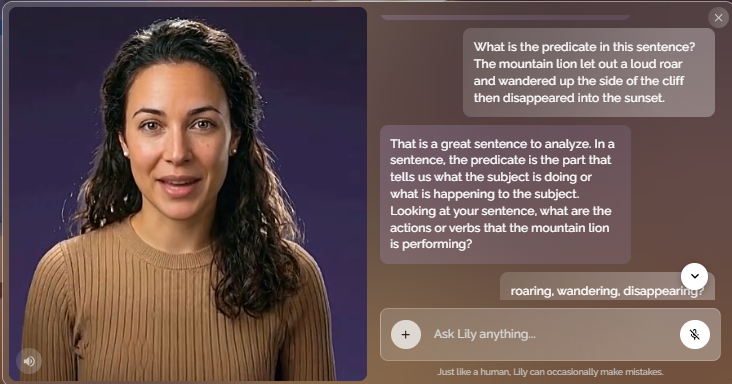
Student: What is the predicate in this sentence? The mountain lion let out a loud roar and wandered up the side of the cliff, then disappeared into the sunset.
Learning Coach: That is a great sentence to analyze. In a sentence, the predicate is the part that tells us what the subject is doing or what is happening to the subject. Looking at your sentence, what are the actions or verbs that the mountain lion is performing?
Once the student ends the session, Learning Coach shows a summary of the student’s work. It looks like this:
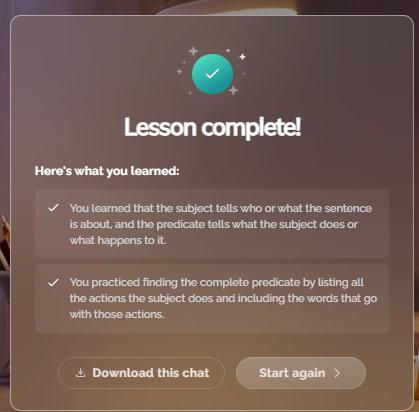
The summary explains what the student learned and how they practiced:
-
You learned that the subject tells who or what the sentence is about, and the predicate tells what the subject does or what happens to it.
-
You practiced finding the complete predicate by listing all the actions the subject does and the words that go with those actions.
Students have the option to download the full transcript of the chat. In the parent dashboard, accessed via a separate parent login, the parent can see strengths, areas for improvement, and suggested actions. Here is an example based on the dialogue above:

Strengths
The student demonstrates a strong grasp of grammatical mechanics by successfully applying the subject-predicate framework to their own original, creative sentences.
Improvement areas
They are currently working on moving beyond simple definitions to explore the conceptual necessity of these parts, showing a readiness to engage with the 'why' behind sentence structure.
Suggested actions
Challenge them to identify the subject and predicate in a sentence that lacks a clear action, such as 'The sky is blue,' to help them broaden their understanding of linking verbs.
Homework Helper
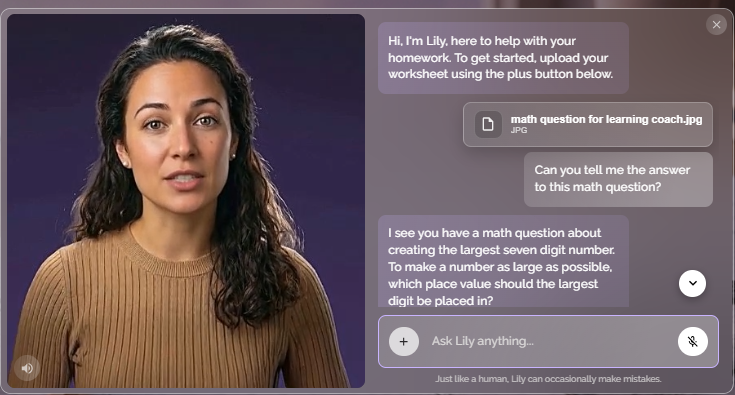
Now let's look at an example of the Homework Helper feature within Learning Coach. The example shows how a student can upload a specific homework question to ask for help without getting the answer.
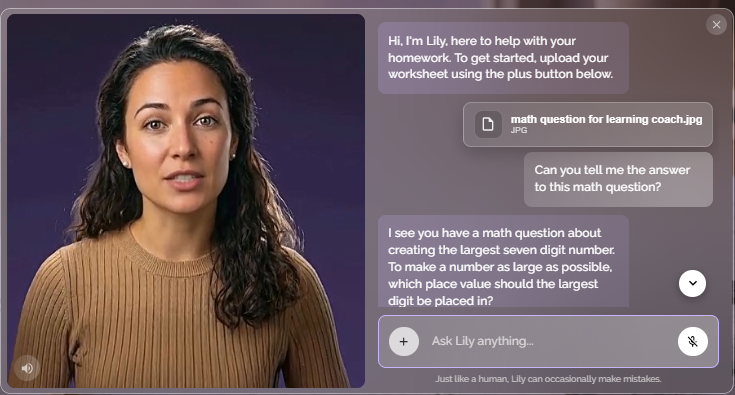
Learning Coach: Hi, I'm Lily, here to help with your homework. To get started, upload your worksheet using the plus button below.
Student: Can you tell me the answer to this math question?
The student uploaded the following image.
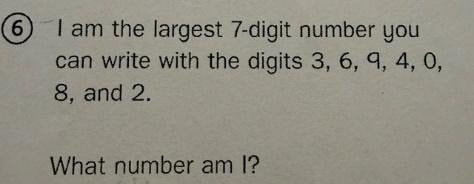
Learning Coach: I see you have a math question about creating the largest 7-digit number. To make a number as large as possible, which place value should the largest digit be placed in?
Student: I don’t know.
Learning Coach: No worries. When we want to make a number as large as possible, we want the biggest digits in the highest place values, which are the values on the far left. Since we have the digits 3, 6, 9, 4, 0, 8, and 2, which of those is the largest?
The same summary and parent dashboard information shown for Learn Anything is available when the student uses the Homework Helper feature.
The goal of Learning Coach is to provide students with a safe, education-focused AI experience that supports learning and responsible AI use. Unlike general-purpose AI tools, Learning Coach combines curriculum-grounded guidance with educational safeguards designed to promote productive, age-appropriate learning experiences.
Lincoln AI Learning Coach is not a human tutor, and it will not write the essay. It will, however, stay grounded in Lincoln Learning Solutions' K-12 curriculum rather than the open internet. In the parent dashboard, it will also show you what your child is working on and what to practice next. Lincoln AI Learning Coach costs $14.99 a month or $149.99 a year per child, and you can see how the coaching works with a 7-day free trial.
Questions Parents Ask
Is it cheating for my child to use AI on homework?
It depends on the tool and the assignment. Copying an answer is cheating with or without AI. Working through a problem with a coach that asks questions is what a tutor does. If your child’s teacher has a rule regarding how AI can be used for classroom assignments, follow the rule.
Does the research apply to younger kids?
The study was with high school students. We have not found an equivalent study for elementary grades; however, we would expect similar results from middle school and upper elementary students.
What if my child only uses ChatGPT?
ChatGPT's Study Mode asks guiding questions instead of answering, and ChatGPT for Teens, launched in August 2026 for 13- to 17-year-olds, lets a teen or parent schedule hours when Study Mode is on by default. In Common Sense Media's review of the teen version, testers found teens could easily turn Study Mode off, and even with it on, a pop-up often offered to show the answer. OpenAI disputes how the testing was done. If your child is under 13, ChatGPT's own rules do not allow an account.
Sources:
-
Bastani, H., Bastani, O., Sungu, A., Ge, H., Kabakcı, Ö. and Mariman, R. "Generative AI without guardrails can harm learning: Evidence from high school mathematics." Proceedings of the National Academy of Sciences, 2025. https://www.pnas.org/doi/10.1073/pnas.2422633122
-
Deloitte, "2026 Back-to-School Survey," July 2026. https://www.deloitte.com/us/en/about/press-room/deloitte-back-to-school-spending-holds-steady.html
-
Klein, Alyson. "ChatGPT's 'Teen Mode' Is Unsafe for Students, Report Concludes." Education Week, October 7, 2026. https://www.edweek.org/technology/chatgpts-teen-mode-is-unsafe-for-students-report-concludes/2026/10
Related Posts
5 Things to Look for in K-12 Curriculum-Aligned AI Study Tools
A middle schooler runs into a tough history question, highlights the prompt, and pastes it into an...
Lincoln AI: Smarter Support Where Learning Happens
In today’s classrooms — both traditional and virtual — students are asked to learn faster and more...
Lincoln AI Product Showcase: Introducing our AI Learning Tools
Lincoln Learning Solutions recently hosted a live event to introduce two new AI-powered tools...