4 min read

AI study tools are quickly becoming a normal part of how students learn, research, and do homework. For school leaders, finding tools that help students learn without putting them at risk is a top priority.
The good news is that you don't need a degree in technology to evaluate an AI tool. You just need to know what to look for in four basic areas: privacy, security, safety, and learning quality.
Why AI Safety Needs Special Attention for Students
Children interact with technology differently than adults. They don't always realize when an AI tool makes a mistake or gives a wrong answer. They are also much more likely to type in personal details without thinking about who might see them.
AI tools built for everyday use by adults can easily expose kids to confusing, incorrect, or inappropriate content.
Bringing an untested AI tool into a school can compromise student privacy, hurt parent trust, and get the school in trouble with federal privacy laws. The right AI tool encourages curiosity and problem-solving. The wrong one creates safety risks for your entire school community.
Understanding the Legal Rules: FERPA and COPPA
Two foundational federal laws are FERPA and COPPA; however, schools may also be subject to other federal, state, and local student privacy laws, district policies, and contractual requirements.
-
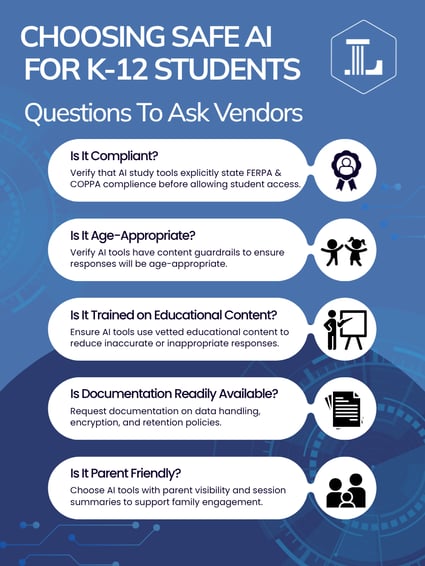
FERPA (Family Educational Rights and Privacy Act): FERPA protects the privacy of student education records. When schools use third-party technology providers that access personally identifiable information from those records, schools must ensure the provider meets FERPA requirements governing how that information is accessed, used, maintained, and disclosed. Schools should establish clear contractual protections limiting student data to authorized educational purposes.
-
COPPA (Children's Online Privacy Protection Act): COPPA governs how online services collect personal information from children under 13. It generally requires parental consent, although schools may provide consent in certain educational contexts when the information is used for a school-authorized educational purpose and not for unrelated commercial purposes. COPPA also includes requirements around notice, security, data retention, deletion, and limiting collection to what is reasonably necessary.
Important Warning: Consumer AI tools (such as ChatGPT) may have age restrictions, data practices, content safeguards, and terms of use that differ from products designed specifically for K–12 environments. Before allowing students to use any general-purpose AI tool, schools should verify age requirements, privacy protections, data-use practices, administrative controls, and alignment with district policies.
Evaluating Content Safety and Age-Appropriateness
A tool can follow privacy laws and still give students questionable information. Many popular AI tools read the entire, unedited internet to generate their answers. That means a fifth-grader asking a simple homework question could get back unverified claims, incorrect information, or adult content.
Instead of tools that pull answers from the web, look for AI created specifically for schools. These tools are built with custom education safeguards, drawing responses only from pre-approved, expert-checked curriculum-based content.
Example in Practice: To keep responses safe and accurate, the Lincoln AI Learning Assistant and Learning Coach are trained on standards-aligned K-12 course materials. This design keeps the conversation focused purely on the lesson and prevents students from stumbling onto unvetted web content.
Coaching vs. Giving Away Answers
Even a safe, private AI tool can harm learning if it simply hands over the answers. An AI tool that writes essays for students or solves their math problems in one click doesn't help them learn; it bypasses the learning process.
Great educational AI acts like a patient tutor. Instead of giving direct answers, it asks guiding questions to help students work through problems step by step.
Example in Practice: The Lincoln AI Learning Coach uses this exact "coaching over answers" approach. When students get stuck on homework, the tool prompts them to think through the next step and explains concepts in plain language suited to their grade level, while giving parents a simple summary of what was covered.
Quick Red Flags to Watch Out For
Instantly stop considering an AI tool if you notice any of these warning signs:
- Ad-Supported Services: Any policy mentioning "advertising partners," "marketing," or "selling data."
- No Way to Delete Data: Companies that keep student conversations forever or use student writing to train their public AI models.
- Missing Legal Paperwork: Vendors that refuse to sign standard school data protection contracts or can't explain how they protect information.
- No Age Limits: Apps that let young children create accounts without parental or school permission.

4 Steps to Test Any AI Tool Before Buying
To make sure your school makes a safe choice, follow this simple process:
-
Build a Vetting Team: Have your tech director check the safety and legal policies, while an experienced teacher tests how well the tool actually supports learning.
-
Ask for Official Safeguards: Confirm what student information is collected, how it is used, where and how long it is retained, who can access it, whether it is shared with third parties, whether it is used to train AI models, and how schools can request its deletion.
-
Run a Small Pilot: Test the program with one classroom or grade level for a few weeks before rolling it out to the whole school.
-
Re-Check Every Year: Companies update their software and privacy rules frequently. Set a reminder to review your tools at the start of each school year.
By choosing technology designed for education, protecting student information, and prioritizing tools that encourage thinking rather than shortcuts, schools can give students meaningful access to AI while managing its risks responsibly.
Related Posts
5 Things to Look for in K-12 Curriculum-Aligned AI Study Tools
A middle schooler runs into a tough history question, highlights the prompt, and pastes it into an...
Why Students Need More Than Answers
Whether students are learning in a classroom, at home, or somewhere in between, one thing remains...
Defusing Difficult Online Students
All teachers encounter students who are difficult or disruptive. Online students are no exception....